

Affiliate disclosure: This article contains affiliate links. If you choose to buy through them, AI Reviews may earn a commission at no extra cost to you.
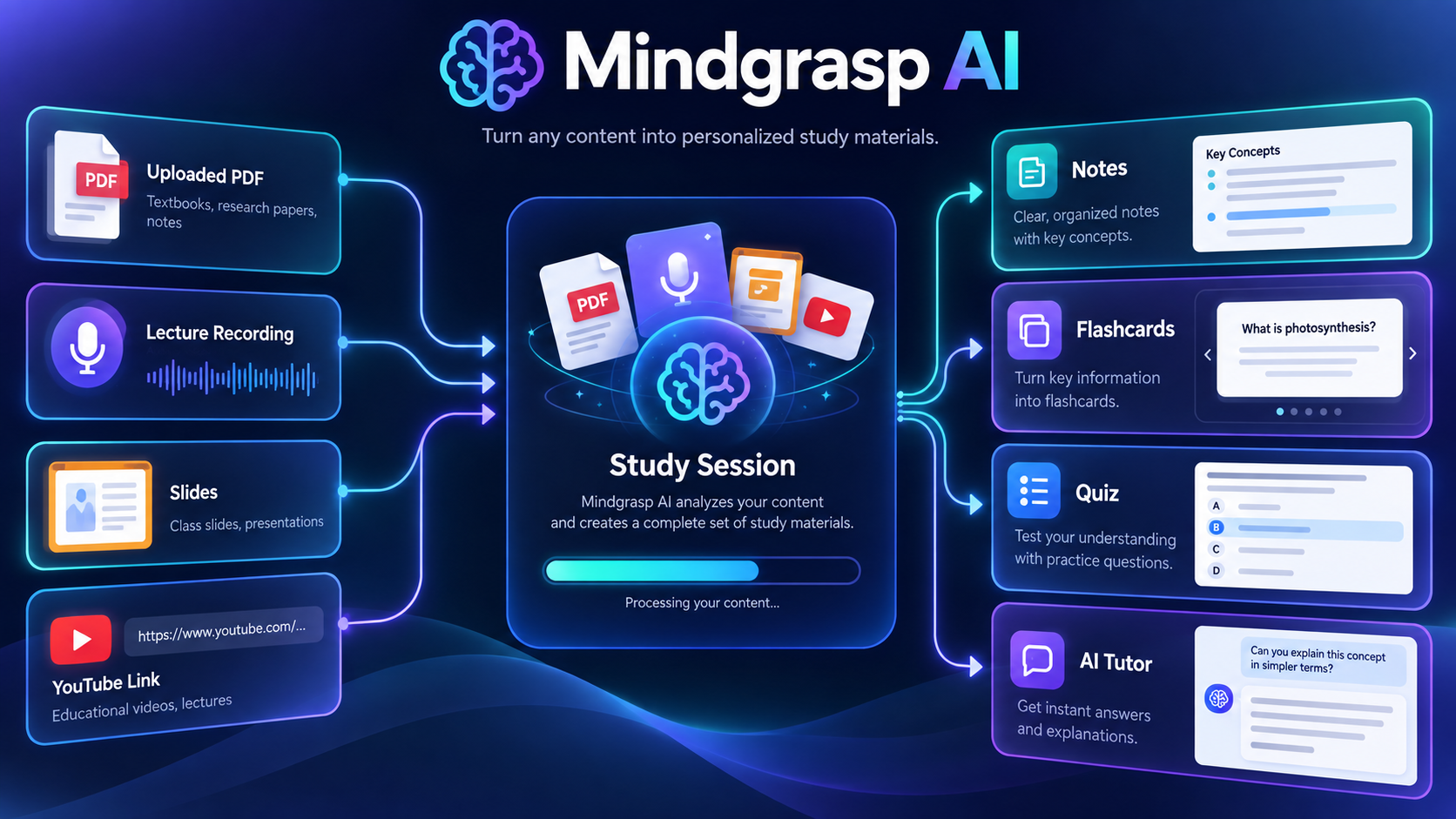
Mindgrasp AI is a study platform that turns course material into a connected study session. Upload a PDF, slides, lecture recording, article, image or YouTube link, then generate notes, summaries, flashcards, quizzes, practice tests and questions for an AI tutor. This Mindgrasp AI review examines its plans, study workflow and the limitations a student should consider before subscribing.
Try Mindgrasp AI and view current plans
The best use case: turn one source into an active study loop
Mindgrasp is most useful when you already have legitimate class material but lack a good method to process it. A long lecture, textbook chapter or dense PDF can become a summary first, then flashcards and a quiz from the same source. That connected workflow is more valuable than using a generic chatbot for unrelated prompts because the questions and study aids remain attached to the material you uploaded.
It is not a replacement for attending class, reading assigned work or verifying facts. Treat it as a study assistant: review its notes against the original, correct errors and use quizzes to identify what you do not understand.
What Mindgrasp can process
The official product pages describe support for PDFs, Word documents, PowerPoint slides, images, articles, web links, audio, videos and YouTube links. The platform can also record a live lecture on supported plans. This breadth is useful for a student whose course material arrives in several formats, but it also means upload discipline matters. Name each study session clearly and do not mix unrelated chapters or subjects into one source set.
From upload to exam preparation
- Create one session per topic. Separate a lecture, chapter or exam objective so the generated work stays focused.
- Upload the source. Check that slides, charts and pages were interpreted correctly before relying on a summary.
- Read the summary and notes. Compare essential definitions, formulas and dates with the original material.
- Generate flashcards and a quiz. Use them for active recall rather than merely rereading output.
- Ask the AI tutor targeted questions. Ask for an explanation, an example or practice questions; do not ask it to complete assessed work for submission.
- Review errors. Revisit missed quiz questions in the source, then repeat the practice later.
Plans and current pricing
| Plan | Monthly price | Notable additions |
|---|---|---|
| Basic | $9.99 monthly or $5.99 monthly billed annually | Unlimited uploads, notes, summaries, flashcards, quizzes and AI questions |
| Scholar | $12.99 monthly or $8.99 monthly billed annually | AI Math Expert, Chrome extension beta, iOS access and live recording |
| Premium | $14.99 monthly or $10.99 monthly billed annually | Multiple files or links in one session and AI image analysis |
The vendor currently describes unlimited file uploads and core study outputs on paid tiers. Exact features and annual terms can change, so confirm the live plan page before purchasing. The key decision is not only price: choose Basic for a simple one-source study workflow, Scholar if lecture capture or the extension matters, and Premium when combining several materials in a single topic is essential.
Where Mindgrasp helps—and where it does not
It can reduce the setup work of making notes and practice aids from your own material. It can also help a student spot gaps before an exam. It cannot establish that a generated answer is correct, assign an official grade or replace a teacher. Mindgrasp itself frames its AI grader as feedback and study guidance, not an official assessment.
Use extra care with technical, medical, legal or numerical material. Check quotations, calculations, diagrams and source citations against the original. A polished summary can still omit an important exception.
Academic integrity and privacy checks
Use Mindgrasp to learn, revise and practice—not to submit generated answers as your own work. Follow your school rules for AI assistance, citation and permitted materials. Before uploading, consider whether the file contains private student information, confidential research or copyrighted content you are not authorized to share. A personal study workflow should not create a privacy or integrity problem.
Buyer scenarios
Good fit: students handling regular PDFs, lectures and slides who want notes, recall practice and questions in one workspace. Try the free account first: anyone unsure whether the platform reads their particular course files correctly. Consider alternatives: learners who only need a single occasional summary, or users looking to automate assignments rather than understand them.
A realistic weekly study workflow
A useful way to test Mindgrasp is to run it alongside one normal week of study. After each lecture, create a separate session from the slides, reading or recording. Read the generated notes while the source is still fresh and flag anything unclear. Before the next study block, use flashcards for recall and take a short quiz without looking at the notes. Missed questions should send you back to the original lecture or chapter, not simply to another AI explanation.
At the end of the week, combine only closely related materials if your plan supports it: for example, one lecture, its assigned chapter and the associated slides. Then create a practice test focused on the learning objectives. This approach is better than dumping an entire semester into one session, because it gives the system clearer context and makes errors easier to trace.
How to judge whether the subscription is worth it
Do not judge the tool by the speed of the first summary alone. Track whether it reduces the time needed to make usable notes, whether flashcards match the actual course concepts and whether quiz mistakes identify genuine gaps. If every output requires extensive correction, a simple manual system may be better. If it consistently turns your legitimate materials into useful review practice, the paid workflow can save meaningful preparation time.
For students on a budget, start with the free account and one demanding source such as a lengthy lecture or PDF. Test the same source with your existing study method. Upgrade only when the added features solve a repeated need: live lecture recording, extension access, math support, mobile study or multi-file sessions.
Limits of automated summaries
Summaries necessarily compress information. They can omit a qualification, overstate a relationship or fail to interpret a diagram correctly. This is why source-aware practice matters. Keep original notes and readings available, use Mindgrasp to generate a study structure and verify anything important before relying on it in an exam or assignment. The tool is strongest when it supports active learning, not when it encourages passive copying.
Final verdict
Mindgrasp AI is a practical study-system option for turning real course material into review notes, flashcards, quizzes and tutor questions. Its value comes from the workflow around your source material, not from treating AI output as automatically correct. Start with one current course topic, test the accuracy and decide whether the additional formats and recording tools justify a paid tier.
Visit Mindgrasp AI and view current pricing
FAQ
Can Mindgrasp summarize PDFs and YouTube videos?
Yes. The official materials list PDFs, documents, slides, audio, video and YouTube links among supported study inputs.
Does Mindgrasp give official grades?
No. Its AI grader provides feedback and study guidance; it is not a replacement for an instructor or grading system.
Is Mindgrasp free to try?
The official study-tools page says that users can create a free account to try the workflow. Check the live plan page for current limits and paid features.
[…] PDF, slide deck, article, or reading into material you can actually review. It supports the broader Mindgrasp AI review and focuses on what to test before relying on AI-generated notes for study or […]
[…] This Mindgrasp AI Video Notes review examines a focused use case: turning an educational video, recorded lecture, or YouTube link into organized notes. It complements the broader Mindgrasp AI review. […]
[…] This Mindgrasp AI Flashcards & Quizzes review focuses on active practice generated from your own uploaded material. It is part of the wider Mindgrasp AI study-tools review. […]
[…] organizing idea: keep one topic’s files, notes, questions, and study aids together. See the main Mindgrasp AI review for the complete platform […]