

Affiliate disclosure: This comparison contains affiliate links. If you choose to subscribe through a link, AI Reviews may earn a commission at no extra cost to you. Editorial assessments are independent; features, prices, and plan terms can change.
Choosing between Mindgrasp AI and Ryne AI is less about finding a single “best” student tool than about identifying the job you need done. Mindgrasp is the clearer choice when your starting point is material you already have: a lecture, PDF, slide deck, recording, article, or link that you want to turn into notes, a summary, flashcards, quizzes, and a repeatable review loop. Ryne AI is broader when your workflow mixes study support with research and writing support: chat around course materials, lecture processing, draft editing, and citation-oriented tools.
Both can save setup time. Neither can verify a claim for you, replace assigned reading, or make generated text acceptable to submit as your own. For students, that distinction matters more than a long feature list. Use either tool to understand, practise, and improve your own work; follow your school’s AI policy, disclose assistance when required, and retain responsibility for every fact, citation, calculation, and final sentence.
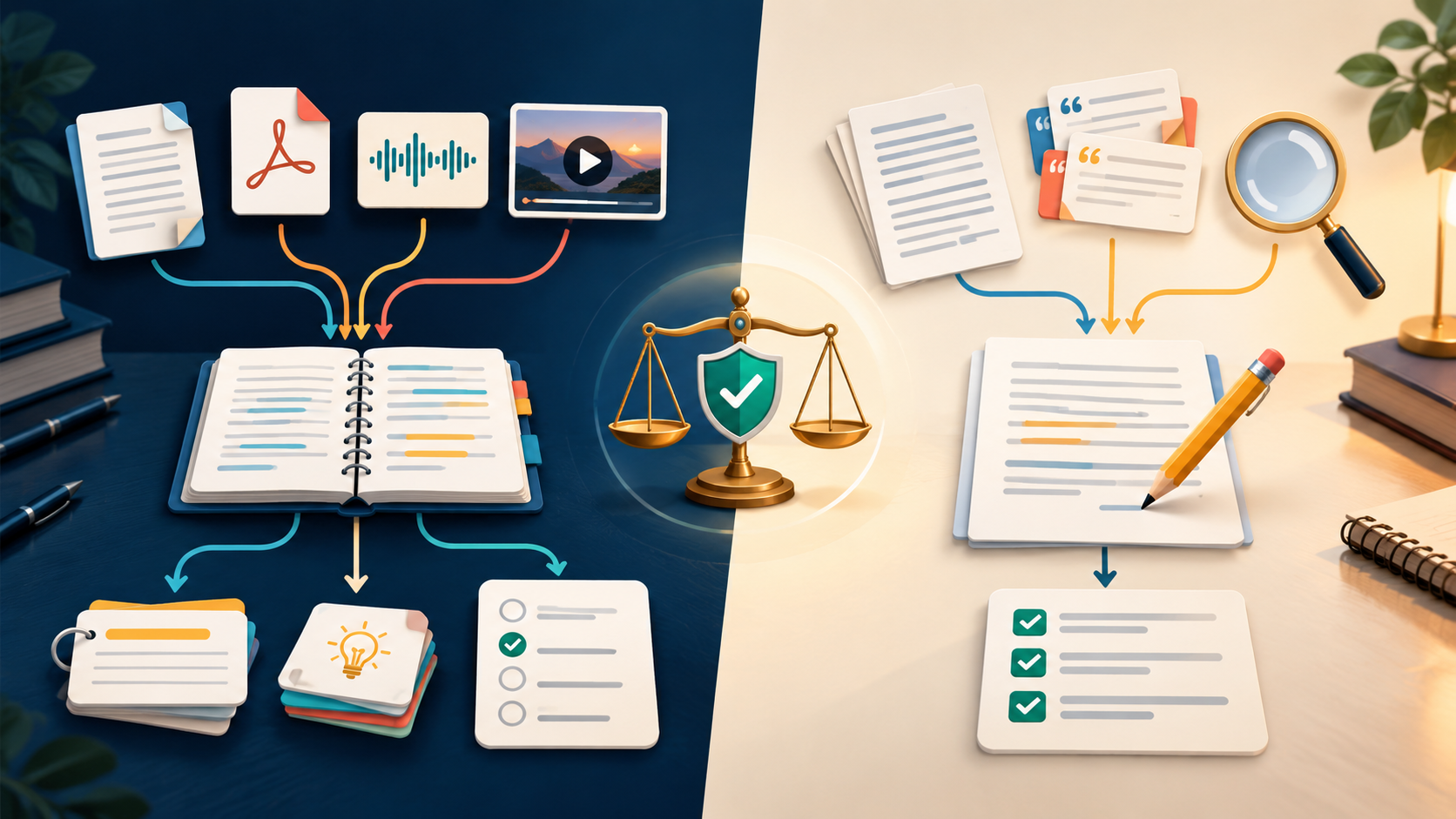
Quick verdict: which workflow fits you?
- Choose Mindgrasp if you want to upload one source and quickly build a source-connected study session. It is especially compelling for turning course documents and recordings into summaries, notes, flashcards, quizzes, and questions.
- Choose Ryne if you want a wider set of study and writing utilities in one account, including course-material chat, Lecture Lab, an editor, and citation-focused research tools. It is a better fit when drafting and checking research references are part of your permitted workflow.
- Choose neither yet if you will not review outputs against your course material. The time saved at the first step can be lost later if a summary omits an exception or a citation needs correction.
Mindgrasp AI: an upload-to-active-study workflow
Mindgrasp is designed around a simple sequence: bring in the material you are actually expected to learn, then make several study aids from that same source. Its official materials list PDFs, DOCX files, PowerPoint decks, images, online articles, audio, video, YouTube links, and Vimeo links among supported inputs. The product can generate notes, summaries, flashcards, quizzes, and answers about the uploaded content. That makes it a natural fit for a student whose work begins with a dense reading, lecture recording, slides, or a chapter rather than a blank writing document.
The practical advantage is context continuity. Instead of copying terms from a PDF into a flashcard app, then writing quiz questions elsewhere, you can use the original material to create a study session. A sound routine is: upload one focused chapter or lecture; compare the first summary with the source; make flashcards for core terms, steps, and distinctions; take a short quiz without looking at notes; then return to the original when you miss or doubt an answer. That is active study, not just faster rereading.
Mindgrasp’s official learning-tools pages also describe a free tier, and its plan page lists unlimited uploads, notes, summaries, flashcards, quizzes, and AI Tutor questions on paid subscriptions, while reserving some features by tier. At the time of checking, the official plan page showed Basic at $9.99 monthly ($5.99/month billed yearly), Scholar at $12.99 monthly ($8.99/month billed yearly), and Premium at $14.99 monthly ($10.99/month billed yearly). Scholar adds options such as AI Math Expert, a Chrome extension beta, iOS access, and live recording; Premium adds multiple files or links in one session and image analysis. Confirm the current checkout page before buying.
Mindgrasp also officially advertises integrations with Canvas, Blackboard, Panopto, and Google Docs, alongside desktop, mobile, iOS, and Chrome-extension access. Treat those as conveniences to test with your actual school materials, not as a reason to upload data without review. Check your institution’s rules and avoid uploading confidential student records, unpublished research, copyrighted material you are not allowed to share, or any assessment content restricted by your instructor.
Read our full Mindgrasp AI review and buyer guide for the wider product context, or see the focused Mindgrasp flashcards and quizzes guide if active recall is your priority.
Try Mindgrasp AI for source-based notes, summaries, flashcards, and quizzes →
Ryne AI: study support plus research and writing utilities
Ryne takes a broader suite approach. Its official Help Center describes Ryne Chat, an Essay Composer, an AI Editor, Lecture Lab, Citation Kitchen, and other tools under one account. For study use, the most relevant pieces are Ryne Chat and Lecture Lab: the company says Chat can accept text, images, and PDFs, and that users can create a chat per subject and upload notes, slides, or readings in PDF, DOCX, or image form. Lecture Lab can take an audio file, YouTube link, or document and produce a transcript, structured notes, flashcards, and a quiz.
That makes Ryne usable for study, but its center of gravity is wider than a single upload-to-study system. A student might use Lecture Lab to process a recorded class, use the resulting notes to identify questions, discuss the course material in a subject chat, then use the editor on a draft they wrote themselves. Citation Kitchen is positioned for finding and checking academic references; Ryne’s official changelog says it can search databases, resolve identifiers, and flag citation problems. That is helpful as a research-checking layer, but you still need to open sources, assess relevance, and make sure a citation supports the exact statement you make.
For academic writing, the responsible boundary is clear: brainstorming, outlining, grammar feedback, research discovery, and citation verification may be allowed or useful depending on the course; submitting AI-generated prose as your original work, fabricating sources, or trying to evade a school’s authorship checks is not responsible use. Ryne markets a Humanizer and AI reports, but this comparison does not recommend detector-evasion workflows. Write from your understanding, cite real sources, and follow the rules your instructor sets.
Ryne’s official Help Center says the free Amethyst plan includes 100 coins, all tools, English-only access, and a 250-word humanizer pass. It describes coins as the usage currency across tools, with costs depending on work performed. The official pricing pages list Sapphire at $29.99 monthly or $19.99/month billed yearly with 10,000 coins, Emerald at $39.99 monthly or $29.99/month billed yearly with unlimited coins under normal use, and Ruby at $109.99 monthly or $99.99/month billed yearly. Availability, coin costs, language limits, and fair-use rules may change, so inspect the live plan and your expected lecture or writing volume before subscribing.
On privacy, Ryne’s Help Center says content is transmitted over an encrypted connection and saved in history until the user deletes it; it also states that account, usage, and content are not shared with schools. This is useful information, not a substitute for reading the current privacy policy or checking what your institution permits. Before uploading coursework or drafts, consider sensitivity, retention, and whether you have permission to use a third-party service.
Read our full Ryne AI review and buyer guide for plan and buyer considerations.
Explore Ryne AI for study, research, and writing-support tools →
Mindgrasp vs Ryne AI: the differences that change the decision
| Decision point | Mindgrasp AI | Ryne AI |
|---|---|---|
| Starting point | A course source you upload or link. | A broader tool suite: chat, lecture processing, research/citation, and editing. |
| Best study loop | Source → notes/summary → flashcards → quiz → source check. | Lecture or course material → chat/notes → research or writing support → manual review. |
| Inputs officially described | Documents, slides, images, articles/links, audio, video, and supported video links. | Text, images, PDFs in Chat; notes, slides, readings, audio, YouTube links, and documents in described study tools. |
| Active practice | Flashcards, quizzes, practice-oriented tools, and questions tied to the uploaded material. | Lecture Lab creates notes, flashcards, and quizzes; the wider suite also supports subject chat. |
| Writing emphasis | Study-first; official pages also list essay-oriented tools. | Stronger emphasis on drafting, editing, citations, and research workflows. |
| Apps and integrations | Officially describes Canvas, Blackboard, Panopto, Google Docs, iOS, and Chrome extension access. | Check current product pages for your needed integration; this comparison does not assume an LMS connection without documentation. |
| Usage model | Plan-based access with published features; verify the live plan page. | Coins and plan limits; verify the live plan page and expected consumption. |
Accuracy, feedback, privacy, and verification
Neither product can turn an uncertain source into certain knowledge. A readable PDF may still omit context; a lecture transcription can mishear a term; flashcards can oversimplify a theory; a citation can be real but irrelevant to your claim. Use generated summaries as maps, not substitutes for the reading. Test flashcards and quizzes as a way to find gaps, then repair those gaps in the original material. For writing, use feedback to improve a draft you understand and can defend.
Build a five-minute verification habit: compare key definitions, formulas, dates, quotations, and exceptions with the primary course source; open every cited reference before relying on it; redo calculations independently; and ask the instructor or a qualified human when a high-stakes issue remains unclear. This is especially important in medicine, law, engineering, finance, coding, and any subject where a plausible answer can still be wrong.
Who should buy which tool?
Buy Mindgrasp if: your recurring pain is converting legitimate course files into organized review material. It is the cleaner choice for students who learn from slides, recordings, PDFs, and links and want a single, source-driven route to notes, flashcards, and quizzes.
Buy Ryne if: you want that study help alongside a more extensive research and writing-support environment, and you are prepared to manage coin usage, inspect citations, and keep human authorship in the process. It can suit advanced learners who need to move from course materials into responsible research and revision.
Use a small test before paying: run one real but non-sensitive chapter or lecture through the tool. Measure not only generation speed but also the time required to verify and correct it. The better subscription is the one that produces useful study practice or review without encouraging you to skip comprehension.
Final judgment
Mindgrasp AI wins this comparison for the student who wants the most direct material-to-study workflow: upload, understand, practise, check, and repeat. Ryne AI is the more expansive option for a student whose permitted workflow also needs research discovery, citations, editing, and lecture processing. The balanced answer is that both can be useful when they reinforce learning rather than substitute for it. Start with a focused trial, keep your source material close, verify important outputs, and never present generated content as original academic work.