

Affiliate disclosure: This article contains affiliate links. If you subscribe through one of these links, AI Reviews may earn a commission at no extra cost to you. This does not affect the editorial assessment.
MakeInfluencer AI is a browser-based AI creator studio for building a consistent virtual character and using it in images, UGC-style ads, short videos and social content. This MakeInfluencer AI review explains the current plan structure, core workflow, limitations and the type of buyer it is best suited for.
Check current MakeInfluencer AI pricing and plans
Quick verdict
MakeInfluencer AI is most compelling for creators, small teams and agencies that need repeatable influencer-style creative without organizing a conventional shoot for every variation. Its main distinction is character consistency across image and video workflows, supported by multiple generation models, motion control, talking-video tools and a shared credit balance. It is not a shortcut to guaranteed brand deals, audience growth or revenue. Budgeting credits and reviewing output quality remain essential.
What is MakeInfluencer AI?
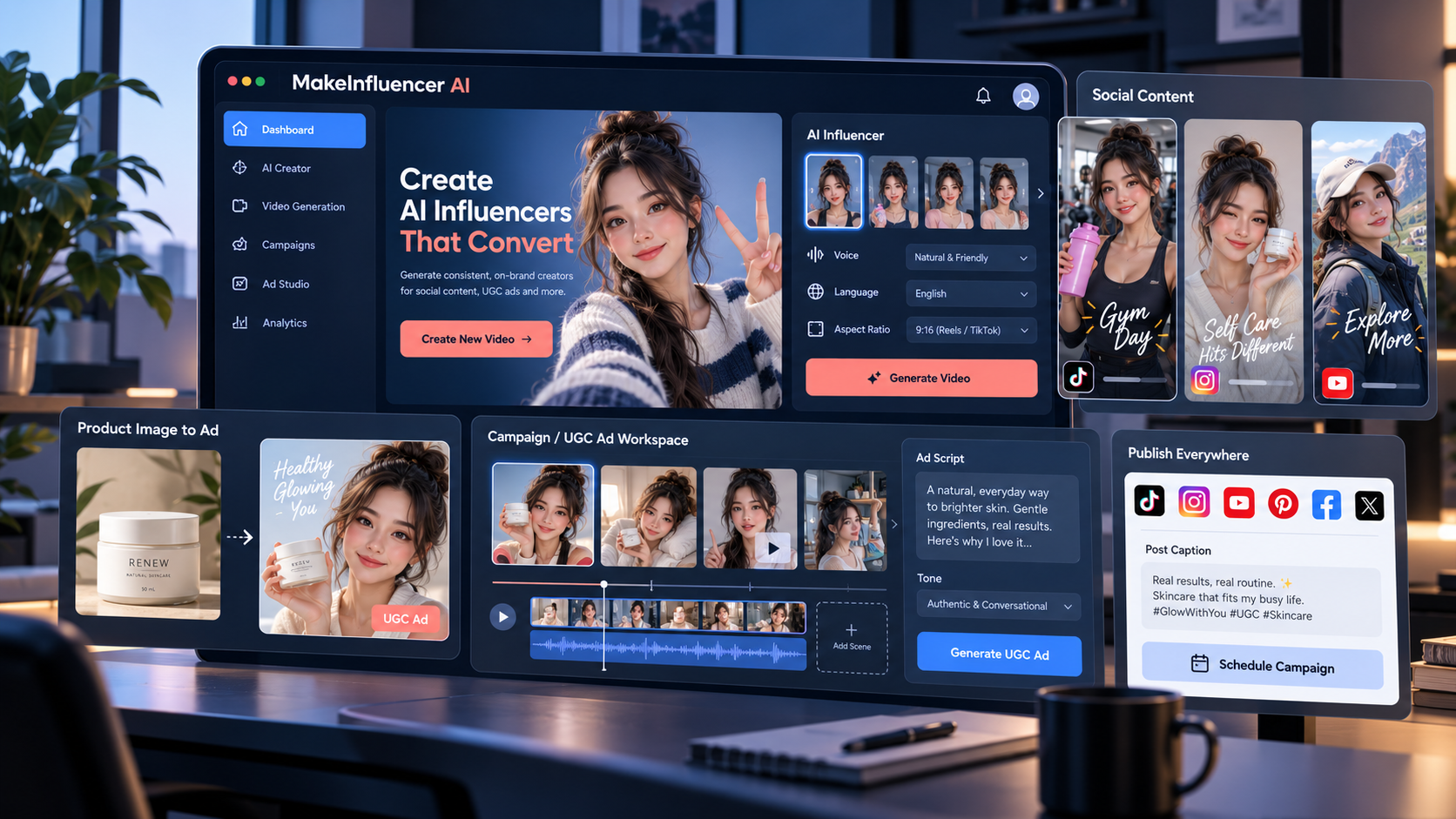
MakeInfluencer AI combines AI character creation with image, video and campaign-oriented workflows. A user can define a persona, generate variations for social posts or product ads, and use features such as motion control, background editing and lip-sync video. The platform also offers AI Canvas workflows, a REST API and a connector for compatible AI clients. That makes it broader than a basic AI avatar generator.
Key features
Consistent AI characters
The product is designed around building a reusable visual persona rather than generating a new unrelated face for each prompt. This matters for a creator brand, recurring UGC-style ad concept or a client campaign where continuity is more valuable than one attractive image.
Image, video and talking-video tools
Current plans include image-generation models and video capabilities. Higher plans add access to more advanced video options, higher output resolutions and talking videos with voice and lip sync. Results still need human review for visual artefacts, accurate product representation and suitable disclosures.
Campaign and creative workflows
For marketers, the practical use case is converting a product concept or asset into several creative angles: social posts, UGC-style variants, hooks and short-form video. This can reduce production friction, but it does not replace brand strategy, advertising approvals or platform-policy compliance.
API and AI Canvas
AI Canvas provides a workflow-building surface, while the API can suit teams that want to integrate generation into an existing product or automation. These features are valuable only if your workflow actually needs repeatable volume or programmatic access.
MakeInfluencer AI pricing
At the time of review, the official pricing page lists Creator at $39/month, Pro at $89/month and Studio at $199/month, with lower effective monthly pricing on annual billing. The plans use credits, so the relevant question is not just the subscription price: compare your intended image, video and custom-character volume with the credit allowance before subscribing.
- Creator: aimed at solo creators; listed with 180,000 monthly credits and 720p video output.
- Pro: aimed at frequent creators; listed with 600,000 monthly credits, custom character training, talking videos and higher-resolution output.
- Studio: aimed at agencies and power users; listed with 1,500,000 monthly credits and priority-oriented benefits.
Prices, supported models and credit costs can change. Confirm the live plan details before checkout.
Who should consider it?
- Creators building a consistent virtual persona for social content.
- Agencies that need creative variations for pitches or client campaign testing.
- Marketers producing UGC-style concept ads and short-form assets.
- Developers who can benefit from a shared image-and-video generation API.
Who should skip it?
- Buyers who only need occasional single images and do not need a reusable character.
- Anyone expecting automated content to guarantee traffic, sales or sponsorship income.
- Teams that cannot review outputs for accuracy, disclosure, brand safety and advertising rules.
- Projects involving restricted, deceptive or unsafe content; the service states that explicit and NSFW content is blocked.
Pros and limitations
Pros
- Character-consistency workflow for recurring content.
- Image, video, motion and lip-sync tools in one credit system.
- Commercial-use positioning and no-watermark claims should be verified in the current terms.
- Useful options for both hands-on creators and API-oriented teams.
Limitations
- Video generations can consume credits quickly, especially at higher quality settings.
- AI output may require retakes, editing and fact-checking.
- Generated influencer content needs clear, ethical use and appropriate audience disclosures.
- The value of advanced plans depends on genuine production volume.
MakeInfluencer AI vs other AI video tools
MakeInfluencer AI is centered on a reusable virtual character and campaign-style content. If your priority is an avatar or UGC ad workflow, it may overlap with tools covered in our GetShorts AI review. If your goal is faceless channel production rather than a persistent influencer persona, see our AITuber review. Choose according to the workflow you need, not a generic “best AI tool” claim.
Final verdict
MakeInfluencer AI is a serious option for buyers who need repeatable virtual-character content, short-form creative and model flexibility in one environment. Start with the plan whose credit allowance matches a realistic month of production, test the quality on your own campaign brief, and assess the live terms before committing to a larger annual plan.
Frequently asked questions
Does MakeInfluencer AI create both images and videos?
Yes. The official product describes image, video, motion-control and talking-video workflows, subject to plan and credit availability.
Can I use MakeInfluencer AI for UGC-style ads?
It is positioned for influencer-style and campaign creative. Review every result for truthful claims, brand requirements and ad-platform rules before publishing.
Is MakeInfluencer AI free?
The platform states that signup is free, while generation features are offered through paid plans and credits. Check the current offer for live details.