

Affiliate disclosure: This comparison contains affiliate links. If you choose to purchase through a link, AI Reviews may earn a commission at no extra cost to you. Our verdict is independent, and features, limits, and prices should be checked at checkout.
Jenni AI vs WriterBuddy AI is a comparison for people who want more than a generic text generator. Both products aim to help users move from a blank page to an editable draft, but they place the center of gravity in different places. Jenni is built around an academic and research-aware document workflow: sources, PDFs, citations, context-aware drafting, and document review. WriterBuddy presents a broader writing toolkit that combines co-writing with paraphrasing, summarizing, grammar, citation, PDF chat, plagiarism checking, and many task-specific utilities.
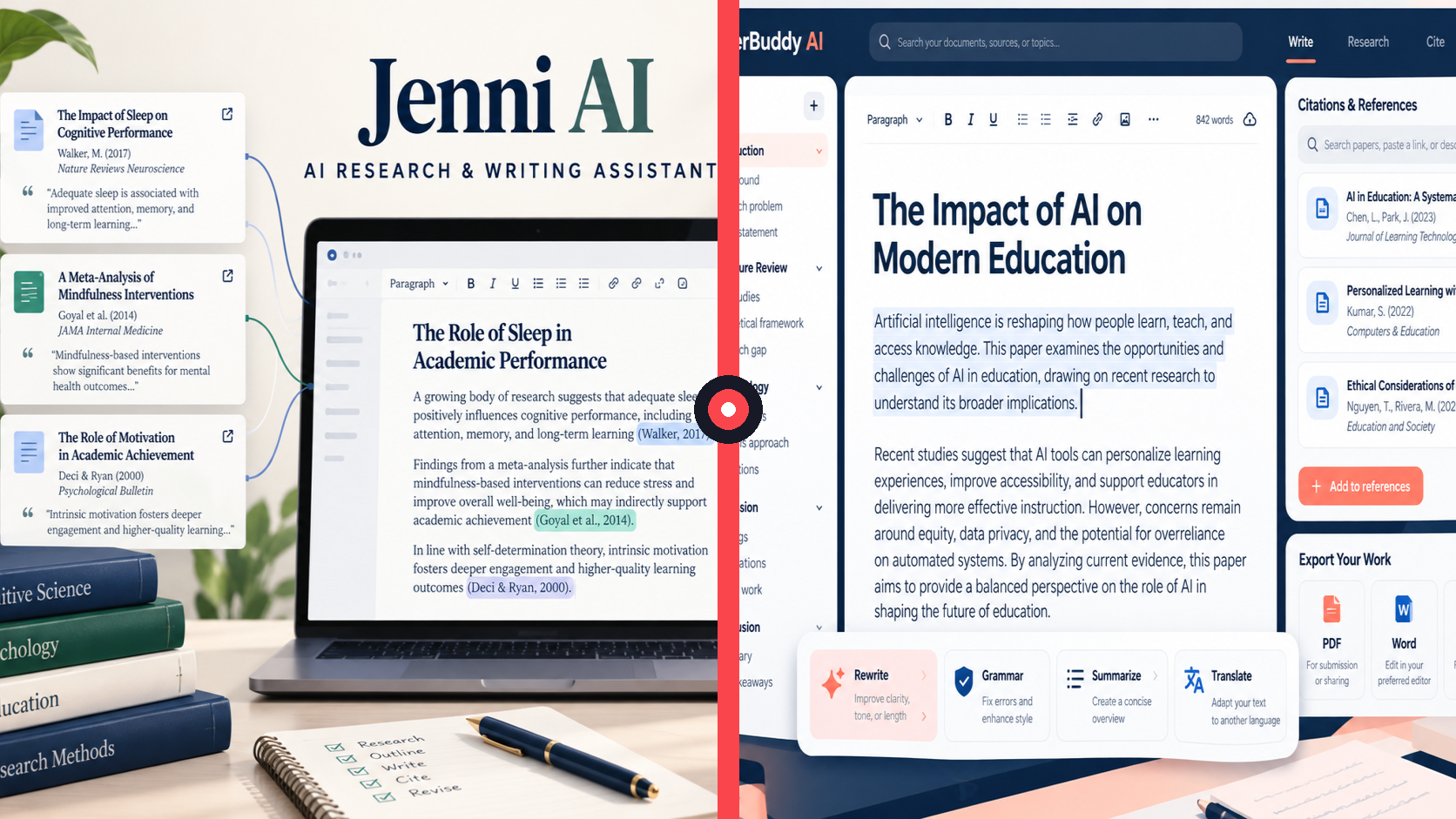
The practical choice is therefore not “which tool writes better?” in the abstract. It is whether your work starts with research material that must remain connected to the draft, or whether you need a flexible set of drafting, rewording, summarizing, and polishing tools for many common writing jobs. This guide uses the products’ official materials and focuses on what a buyer can verify before subscribing.
Quick verdict
Choose Jenni AI if your recurring job is to turn papers, PDFs, and citations into a structured academic or professional document. Its official documentation describes a unified editor with AI Autocomplete, AI Chat, citation management, a searchable research library, document reviews, and collaboration. That concentration is meaningful when source handling is part of the writing process rather than a last-minute formatting task.
Choose WriterBuddy AI if you want a broad, approachable workspace for writing tasks and editing passes. Its official site highlights Co-Writer for brainstorming, autocomplete, writing, editing, summarizing, grammar checking, and citations, alongside ChatPDF, a paraphraser, text summarizer, plagiarism checker, and 40+ additional writing tools. That makes it a practical fit for content writers, students, and professionals who move between short-form and long-form assignments.
Neither tool removes the need to validate facts, read original sources, follow academic or employer rules, and revise the final copy. A citation generator can format a reference; it cannot guarantee that an argument fairly represents the source. An AI rewrite can improve flow; it can also change meaning. Treat each platform as an accelerator for a reviewable writing process.
Explore Jenni AI and current plan details
Check WriterBuddy AI plans and current pricing
Jenni AI: research, citations, and drafting in one document flow
Jenni’s official introduction describes it as an AI writing platform for academic and professional work. Its core proposition is not simply a chat box that produces text. The product combines a document editor with drafting, editing, citation, and review features so that writers can work from an outline through a cited document without assembling separate tools for every step.
Writing flow
Jenni AI Autocomplete is designed to work inside the document. According to Jenni’s documentation, it considers headings, prior text, section prompts, citations, and the current sentence before offering a continuation. A writer can accept, partially accept, refine, or ignore the suggestion. This is a useful distinction for people who prefer to control the structure and write progressively rather than submit a large prompt and accept a complete draft.
Jenni also provides AI Chat alongside the editor. With the current document enabled, Chat can use the draft as context; users can add selected PDFs, library collections, and search permissions. In a source-heavy project, that can reduce the friction of moving between the paper, notes, bibliography, and prose. It does not make the result automatically correct, but it offers a more direct route from a question about a source to a change in the relevant passage.
Research and citations
This is where Jenni has the clearest official differentiation. Its citation tools can search by title, author, DOI, URL, or keyword; insert an in-text citation; and build a bibliography. The official documentation also describes filters for year, citation count, impact factor, and preprints in relevant research surfaces. The library can hold PDFs and research sources, while AI Chat can cite a selected source, library material, or web material when those sources are enabled.
For a literature review, thesis chapter, policy brief, or evidence-led report, this source-aware approach can be more valuable than a long list of standalone prompts. It gives the writer a repeatable loop: collect material, filter or inspect it, draft with context, insert a citation, and then check the final claim against the original publication. The key word is check. A formatted reference and an inline citation are not proof that the surrounding sentence is accurate or complete.
Editing and quality control
Jenni’s official product documentation lists AI editing for rewriting, simplifying, translating, or strengthening selected text. It also lists document reviews for proofreading, claim confidence, source quality, tone, and peer-review checks. These functions are especially relevant when a long draft needs a second pass, but they should guide attention rather than replace editorial judgment. A “claim confidence” signal is not a substitute for opening the cited source; a tone suggestion is not necessarily appropriate for a specific journal, client, or discipline.
Limits and pricing that buyers can verify
Jenni publicly documents Free, Plus, and Pro plans. At the time of the official plan documentation, Plus is listed at $12 per month and Pro at $29 per month, with regional pricing and annual billing options also described. The Free plan has finite allowances, while Plus includes 5,000 autocomplete suggestions per month, 500 AI edits, 500 AI Chat messages, and 10 reviews; Pro is listed with unlimited AI generations. The documentation also specifies different PDF page and upload limits by plan. Because allowances and checkout pricing can change, verify the live billing page for your location before paying.
For an occasional writer, the Free plan is a sensible way to test the editor with one representative project. For a high-volume academic writer, the deciding factor is not the headline price but the limits you would actually hit: PDF size, pages per PDF, chat use, edits, reviews, and export needs.
Try Jenni AI for a source-aware writing workflow
WriterBuddy AI: a broader writing and editing toolkit
WriterBuddy positions itself as an AI writing assistant for academic and professional goals. Its official site describes an all-in-one path to research, write, edit, and cite, with a particularly broad range of task-specific tools. The product is less narrowly framed around a research-document editor and more around getting support at many points in the writing process.
Writing flow
WriterBuddy’s Co-Writer is its central writing feature. The official description says it can help users brainstorm, autocomplete, write, edit, summarize, check grammar, and create citations in one place. That is a flexible proposition for a writer producing blog posts, emails, social copy, essays, briefs, or drafts that need alternative phrasing. Rather than selecting a research-first workflow, the user can move between the specific assistance needed for the next step.
The trade-off is that a broad toolkit requires a clear workflow on the user’s side. A productive pattern is to begin with a brief, make an outline, draft one section at a time, use a targeted rewrite only where it improves clarity, and perform a human final edit. Asking for a polished “final” article in one prompt often produces generic transitions and claims that have not been checked.
Research, PDFs, and citations
WriterBuddy officially advertises a Citation Generator that supports MLA, APA, Chicago, and more. It also offers ChatPDF, described as a way to ask questions of PDF documents, extract information, and obtain summaries. These tools can speed up source discovery and formatting for a writer already working with credible material.
However, buyers should separate assistance from verification. For academic work, read the relevant pages in the PDF, confirm the author and publication details, and make sure a citation actually supports the sentence in which it appears. For business content, check product facts against first-party pages and preserve the source links in your research notes. WriterBuddy’s official site makes useful productivity claims about the toolkit, but it should not be treated as an authority on external facts.
Editing and text improvement
WriterBuddy’s editing range is broad. The official site highlights a paraphraser and rewriter, text summarizer, grammar checker, plagiarism checker, and an AI content detector, as well as many additional tools. For non-native English writers or busy content teams, this variety can be convenient: summarize a background document, refine a paragraph, check grammar, and reshape a passage without changing products.
Use those utilities cautiously. A paraphrase can preserve the main idea while losing a qualification. A summary can omit context. A grammar suggestion can flatten a deliberate voice. Plagiarism and AI-detection results should not be represented as definitive proof of originality, authorship, or policy compliance. The responsible output is a writer-owned final draft that has been reviewed for meaning, facts, attribution, and audience fit.
Pricing and credits
WriterBuddy’s public homepage promotes a free start and mentions 2,000 free credits. The official homepage also includes an FAQ entry for what one credit means, but buyers should use the current product and checkout pages to confirm which features consume credits, how paid access works, and what limits apply. We are not assigning a fixed paid price here because a verifiable, accessible official price table was not available in the official material reviewed for this comparison. That is a reason to inspect the live offer before committing, not a reason to assume the free allowance will match ongoing volume.
Start with WriterBuddy AI’s free writing tools
Head-to-head: which workflow fits your work?
| Buying question | Jenni AI | WriterBuddy AI |
|---|---|---|
| Primary orientation | Research-aware document writing | Broad AI writing and editing toolkit |
| Drafting style | Context-aware autocomplete inside a document | Co-Writer for brainstorming, drafting, editing, and summaries |
| Research support | Library, PDFs, citation search, filters, and source-aware chat | ChatPDF, citation generator, and research-oriented writing tools |
| Text improvement | Selected-text edits and document reviews | Paraphrasing, grammar, summaries, plagiarism tools, and more |
| Best fit | Students, researchers, and source-heavy professional writers | General writers, content creators, students, and editing-heavy workflows |
Who should choose Jenni AI?
Jenni is the stronger match when research is inseparable from drafting. Choose it if you regularly work with journal articles, PDFs, bibliographies, source filters, and long documents where a citation-aware editor saves time. It also suits writers who prefer to build a document progressively and want autocomplete, chat, editing, reviews, and citations attached to the same project.
It is less compelling if most of your work is short marketing copy, casual rewriting, or quick summaries and you do not need a research library. In that case, a broad toolkit may be more direct.
Who should choose WriterBuddy AI?
WriterBuddy is the better fit if your day includes many different writing tasks: outlines, articles, email drafts, rewrites, grammar passes, paraphrases, summaries, and PDF questions. Its feature breadth can be useful for a solo writer or a team that wants one familiar destination for common text transformations. It also has official support for writing in 25+ languages, which may matter for multilingual workflows.
It is not a replacement for a disciplined research process. If a project depends on rigorous citations, source filters, a reusable literature library, and deep document-level review, Jenni’s official feature set is more directly aligned with that need.
Final recommendation
For AI writing and research, Jenni AI wins when the work is source-heavy and document-led. Its official workflow is specifically designed to connect writing with PDFs, citations, library context, and review tools. WriterBuddy AI wins when you want a wider writing utility belt for drafting, editing, paraphrasing, summarizing, grammar, and PDF interaction without centering every project on an academic research document.
The most honest buying test is small: use each free entry point with one real, non-sensitive task. Draft a section, revise it, check a citation or source, export or transfer the result, and count the manual cleanup. Choose the product that removes your actual bottleneck while leaving you in control of evidence and final language.